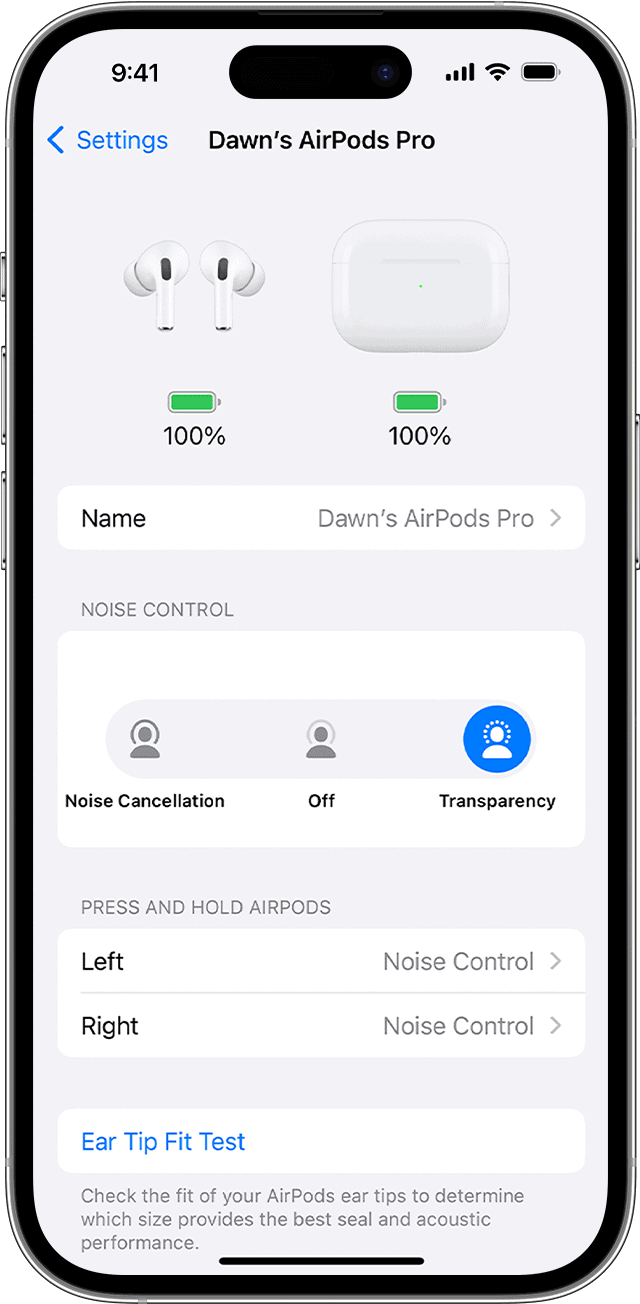
The AirPods Pro have a feature called Active Noise Cancellation, which reduces background noise to improve the listening experience in noisy environments. This technology uses advanced microphones and software to tailor the sound for each ear. The AirPods Pro also have a transparency mode, allowing users to control how much of the surrounding noise they hear. This can be useful when it’s important to stay aware of your environment, such as when walking in a busy street. Users can easily switch between noise cancellation and transparency mode either through the device connected to the AirPods or directly on the earbuds themselves. Adjusting the noise cancellation settings can enhance the listening experience, allowing users to customize their audio experience for different situations.
Drown Out the World: AirPods Pro and Noise Cancellation
How It Works
AirPods Pro use tiny microphones to listen to the noise around you. Then, they create an opposite sound wave that cancels out the noise. This happens in real-time, so it can adapt to changing environments.
Two Modes: Noise Cancellation and Transparency
Adaptive Transparency
This newer feature adjusts the intensity of Transparency Mode based on the noise around you. It lets in some sounds, but reduces loud, harsh noises for a more comfortable experience.
Personalized Spatial Audio
This feature uses your iPhone’s TrueDepth camera to scan your ears, creating a sound profile unique to you. This enhances the spatial audio experience and makes it more immersive.
Additional Tips
Noise-Cancelling Features Comparison
Key Takeaways
Understanding the AirPods Pro Noise Control
The AirPods Pro boast a sophisticated noise control system enabling users to tailor their listening experience. This system hinges on advanced tech and user-friendly controls.
Design and Hardware
The AirPods Pro feature a sleek design with built-in microphones and force sensors. These components work in unison to detect external sound or the pressure of a finger tap. The hardware, including the force sensor, allows users to switch between noise-control modes easily. Apple’s design includes three sizes of soft, flexible eartips that conform to the contours of each ear, enhancing the noise cancellation feature by creating a more effective seal.
Types of Noise Control Features
AirPods Pro offer three noise control modes: Active Noise Cancellation (ANC), Transparency mode, and Off. ANC uses the microphones to detect external noise, then counters it with anti-noise. Transparency mode lets outside sound in, allowing users to hear their environment while wearing the AirPods. Users can switch these modes off if they prefer no noise control.
Activating Noise Cancellation
To activate noise cancellation on the AirPods Pro, users need to press and hold the force sensor on the stem of an AirPod. They can also toggle between the noise-control modes using the Control Center on an iOS device or by using Siri. The noise control icon in Control Center is an easy visual touchpoint for adjusting settings. Users customize the controls, deciding whether a long press activates noise control or Siri, and which right or left AirPod reacts to this gesture.
Optimizing AirPods Pro Noise Cancellation
To get the best out of your AirPods Pro’s active noise cancellation feature, it’s essential to focus on fit, device settings, and troubleshooting.
Personalization and Comfort
For optimal noise cancellation, the right fit of the AirPods Pro is crucial. Apple provides three sizes of ear tips to ensure that users find the best fit. A well-sealed ear canal can significantly improve the listening experience by keeping ambient noise out. The AirPods Pro also offers an Ear Tip Fit Test. Access this by going to theBluetooth settingsin your iOS device and selecting your AirPods Pro. Checking for a secure fit can make a big difference in comfort and audio quality.
Using AirPods Pro with Various Devices
The AirPods Pro noise cancellation function seamlessly works across various devices such as the iPhone, iPad, Mac, and Apple Watch. Users can change the noise control settings directly on these devices. On an iOS device or iPadOS, head toSettings, selectBluetooth, then tap on the info icon next to the AirPods Pro. For Mac users, click on the Control Center in the menu bar and selectBluetooth. Here, users can choose between noise cancellation, transparency mode, or turn off these features.
Troubleshooting Common Issues
If users face issues with noise cancellation, they should check the volume control and ensure their firmware is up to date. They may also need to verify their AirPods Pro are clean since debris can affect performance. For troubleshooting, one can restart their paired device, re-pair the AirPods through theBluetooth settings, or reset the AirPods Pro entirely. If problems persist, Apple’s support website provides additional help or users might want to contact customer service for assistance.