Apple’s Audio Sharing feature provides a seamless way for two people to listen to the same audio from a single iPhone, iPad, or iPod touch using compatible AirPods or Beats headphones. This feature enhances shared listening experiences, whether it’s watching a movie on a flight, enjoying music together, or listening to a podcast during a commute.
This article provides a clear and concise guide on how to use Apple’s Audio Sharing, including a list of compatible devices and headphones, step-by-step instructions, troubleshooting tips, and examples of practical use cases. It also touches on the broader context of wireless audio sharing technology and its future potential.
Sharing Audio with Friends: A Guide to Apple’s Audio Sharing
What is Apple Audio Sharing?
Apple’s Audio Sharing feature allows you to share audio from an iPhone, iPad, or iPod touch with two sets of AirPods or compatible Beats headphones. This is a great way to listen to music, watch movies, or enjoy other audio content with a friend or family member.
Compatible Devices and Headphones
Audio Sharing works with the following devices:
It is compatible with these headphones:
How to Use Audio Sharing
Troubleshooting Audio Sharing
If you’re having trouble using Audio Sharing:
Use Cases for Audio Sharing
Audio Sharing can be useful in various situations:
Privacy Considerations
When using Audio Sharing, keep in mind that the other person will be able to hear everything you’re listening to. Be mindful of this when sharing sensitive or private audio content.
The Evolution of Audio Sharing Technology
Apple’s Audio Sharing is part of a larger trend of wireless audio sharing technology. This technology allows for more convenient and personalized listening experiences. As Bluetooth technology and wireless audio standards continue to improve, we can expect even more advanced audio sharing features in the future. These advances could include sharing with more than two devices, improved audio quality, and even more seamless connection processes. The convenience of these features will likely continue to make them a popular way to share audio content.
Audio Sharing on Apple Devices
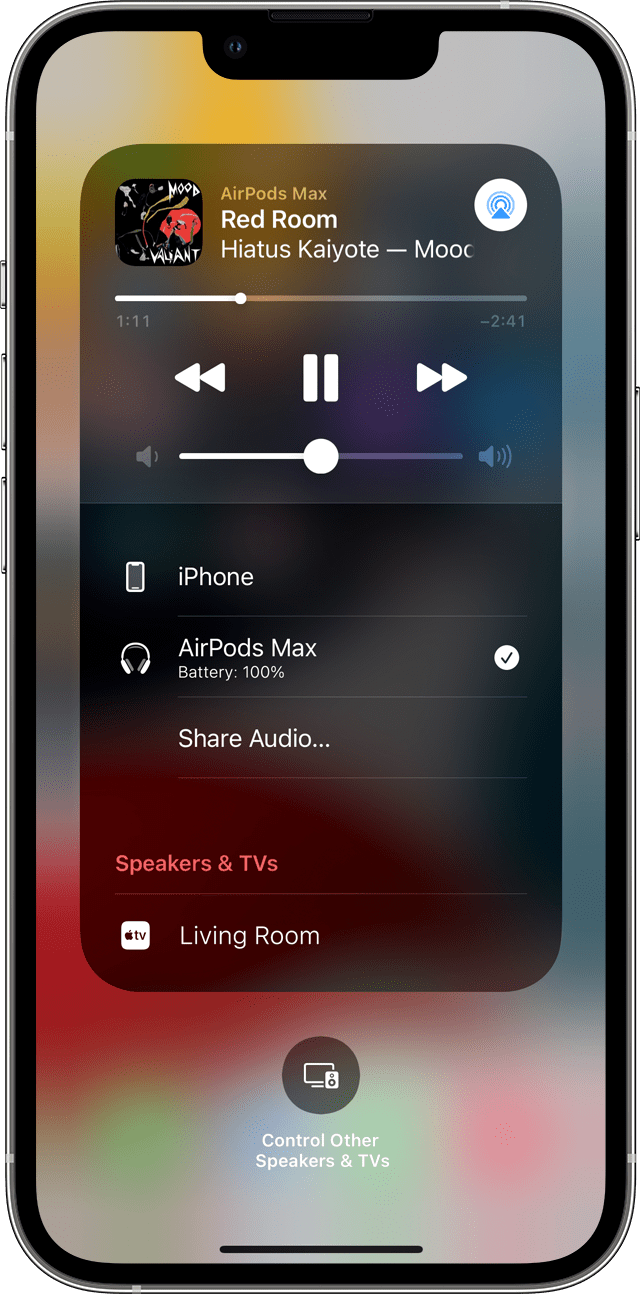
Apple’s Audio Sharing feature allows users to connect two pairs of compatible headphones to a single iPhone or iPad. This functionality works with AirPods and select Beats headphones. Users can activate Audio Sharing through the Control Center or the Now Playing widget on their device.
The feature is available on iPhone 8 and later models, as well as newer iPad versions. It requires iOS 13.1 or iPadOS 13.1 or later. Audio Sharing enables friends to listen to the same music or watch videos together without a headphone splitter.
Frequently Asked Questions
Sharing Audio Between Two AirPods Sets on One iPhone
To share audio between two AirPods sets on a single iPhone, follow these steps:
Both AirPods sets will now play the same audio. This feature works with iPhone 8 or later models running iOS 13 or newer.
Connecting Two AirPods to an iPad for Audio Sharing
The process for connecting two AirPods to an iPad is similar:
Both pairs of AirPods will receive the same audio stream. This feature requires an iPad running iPadOS 13 or later.
Sharing Audio Between AirPods and Wired Headphones
Currently, iOS devices do not support sharing audio between AirPods and wired headphones simultaneously. Theaudio sharing featureis limited tocompatible wireless headphones, including AirPods and some Beats models.
Listening to Shared Audio on iPhone Without AirPods
Users can share audio on an iPhone without AirPods by:
These methods allow multiple users to listen to the same audio source on one iPhone.
Playing Audio from Two Devices on AirPods
AirPods cannot play audio from two different devices simultaneously. They can connect to multiple devices but will only play audio from one source at a time. Users can switch between connected devices for audio playback.
Audio Sharing with Third-Party Bluetooth Headphones
Audio sharing on iPhones is primarily designed for Apple and Beats headphones. Mostthird-party Bluetooth headphonesare not compatible with this feature. Users should check their headphones’ specifications or contact the manufacturer to confirm compatibility with Apple’s audio sharing function.
