Fall protection is a critical feature in wearable technology, especially for users who may face a high risk of falling. TheApple Watchincorporates fall detection as a key safety component. It uses advanced sensors to monitor for sudden changes in motion and impact, triggering an alert system when a fall is detected.
The Apple Watch’s fall detection function interfaces seamlessly with the Health app and Emergency SOS service. Users can configure settings to ensure the smartwatch is tailored to their needs, which is particularly useful for those with health conditions or age-related risks.
Fall Detection: Your Guardian Angel on the Wrist
What is Fall Detection?
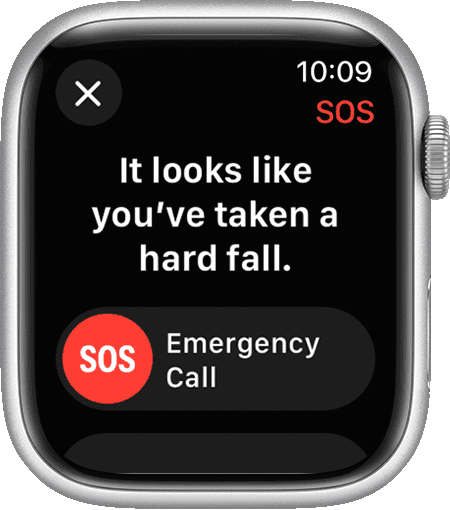
Fall Detection is a potentially lifesaving feature on Apple Watch Series 4 and later models. It uses a combination of sensors to detect if the wearer has experienced a hard fall. When a fall is detected, the watch alerts the user and gives them the option to contact emergency services or dismiss the alert. If the user is unresponsive for about a minute, the watch will automatically call emergency services and notify emergency contacts.
How Does It Work?
The Apple Watch utilizes several sensors to detect a fall:
These sensors work together to analyze the wearer’s movement and determine if a hard fall has occurred.
When a Fall is Detected
If the Apple Watch detects a hard fall, it will:
You can choose to:
If you are unresponsive for about a minute, the watch will automatically:
Who Should Use It?
Fall Detection is especially useful for:
While Fall Detection is not foolproof, it offers an extra layer of safety and peace of mind for those who may be vulnerable to falls.
Key Takeaways
Fall Detection Technology
The Apple Watch Series 4 and later models, including the Apple Watch SE and Apple Watch Ultra, come with fall detection technology. This feature is crucial for user safety. It uses advanced hardware and algorithms to detect a fall. Upon detection, it activates an emergency SOS feature.
Understanding Fall Detection and SOS Features
When an Apple Watch detects that a user has fallen, it prompts them to indicate if they are okay. If the user does not respond in a timely manner, the watch takes action. It may contact emergency services on the user’s behalf. This quick response can be vital in situations where every second counts.
Hardware and Sensors Enabling Fall Protection
Fall detection functions are possible because of the watch’s sophisticated hardware. The device uses an accelerometer and a gyroscope. These sensors measure up to 32 g-forces and analyze wrist trajectory and impact acceleration to determine if a user falls.
Accuracy and Algorithm Improvements
To minimize false alarms, the Apple Watch continually refines its algorithm. This improvement allows for better discernment between a real fall and high-impact activities that may mimic a fall. The algorithm uses a combination of sensor input and real-time data to improve accuracy. This results in more reliable fall detection.
Setting Up and Using Fall Detection
Fall Detection is a critical feature on Apple Watches that can call for help when a person has taken a hard fall and can’t get up. This section will show you how to set up this lifesaving feature, including adding emergency contacts and health details, activating Fall Detection across different watch models, and responding to alerts correctly.
Configuring Emergency Contacts and Health Information
Before using Fall Detection, it’s important to set up your Medical ID and Emergency Contacts on your iPhone. These details provide emergency responders with critical information and notify your loved ones in case of an incident. Here’s how:
Activating Fall Detection on Various Apple Watch Models
For Apple Watch users, activating Fall Detection is simple and can be done via the iPhone Watch app or directly on the watch. Here are the steps:
On the iPhone:
Directly on the Apple Watch:
Responding to Fall Detection Notifications
When an Apple Watch detects a fall, it taps you on the wrist, sounds an alarm, and displays an alert. If you’re okay, you can dismiss the alert by pressing theDigital Crown, tappingClosein the top-left corner, or selectingI’m OK. If you’re immobile for about a minute, Emergency Services are automatically called, and your emergency contacts get your location. Here’s how to respond:
By following these clear instructions, Apple Watch users can take full advantage of the Fall Detection feature for added safety and peace of mind.

How to turn off sos on apple watch
To prevent accidental triggers, you’re able to disable the “Hold Side Button to Dial” feature in your Apple Watch settings. This way, holding the side button won’t automatically initiate Emergency SOS. However, you can still access Emergency SOS by swiping the Emergency SOS slider on your watch face or using Siri.
What happens if you accidentally call emergency sos on apple watch?
If you accidentally trigger Emergency SOS on your Apple Watch, it will initiate a countdown and sound an alarm. If you don’t cancel it within the countdown period, your watch will automatically call emergency services and send a text message with your location to your emergency contacts.
