Is your iPhone 8 not charging? You might need to fix the charging port. This guide will show you how to do it yourself or find help.Fixing an iPhone 8 charging port can save you money and extend your phone’s life.Many people think they need a new phone when the charging port stops working. But often, you can fix it with a few simple steps. A broken charging port can be frustrating. Your phone might charge slowly or not at all. It might also have trouble connecting to other devices. This guide will help you solve these problems and get your iPhone 8 working again.
Fixing Your iPhone 8 Charging Port: A Step-by-Step Guide
Tools and Materials
Repair Steps
Additional Tips
Troubleshooting
If your iPhone 8 still doesn’t charge after replacing the charging port, try the following:
Key Takeaways
Assessing iPhone 8 Charging Port Issues
Charging port problems can stop an iPhone 8 from working properly. Users need to check for common issues and take safety steps before trying repairs.
Identifying Common Problems
Loose connections often cause charging issues. Users should unplug and replug the cable to see if that fixes it. If not, they can try a different outlet or charger. Dirt in the port is another frequent problem. Lint and debris can block the connection. A close look with a flashlight may reveal buildup.
Software glitches can also affect charging. Updating to the latest iOS version might solve these issues. If the phone still won’t charge, there may be damage to the port or cable. Bent or broken pins inside the port can prevent charging. Frayed or torn cables should be replaced.
Safety Precautions and Preparation
Safety is key when working on an iPhone. Users should turn off the device before inspecting or cleaning the port. This prevents short circuits. It’s important to avoid using metal tools, which can damage the port. A soft brush or compressed air is safer for cleaning.
Liquids are very risky. If the phone got wet, it needs to dry fully before charging. Trying to charge a wet phone can cause more damage. In some cases, it’s best to seek help from experts. Apple Stores or authorized providers can safely fix complex issues. They have the right tools and parts to repair damaged ports without risking the phone.
Step-by-Step Charging Port Replacement
Replacing the iPhone 8 charging port takes careful work. This guide covers taking apart the phone and swapping out the port.
Disassembly of the iPhone 8
Start by turning off the iPhone 8. Remove the two pentalobe screws at the bottom edge near the charging port. Use a suction cup to lift the screen, then slide an opening pick along the edges to separate it. Disconnect the display cables from the logic board.
Take out the screws holding the battery connector bracket. Unplug the battery. Remove screws securing the lower components. Detach the Taptic Engine, speaker assembly, and other parts blocking the charging port.
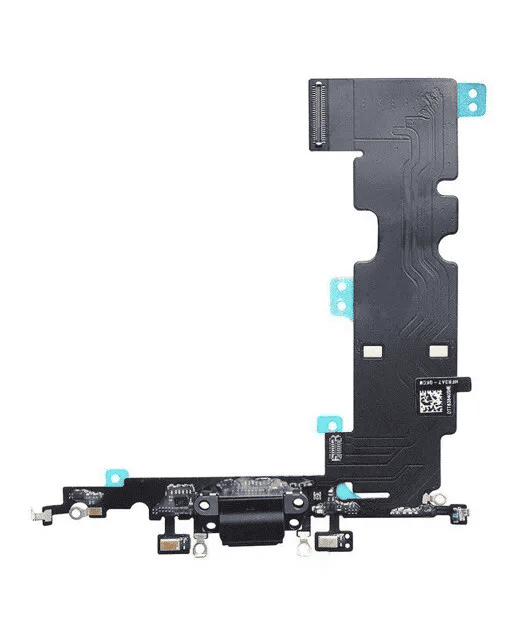
Carefully disconnect the charging port flex cable from the logic board. Remove any remaining screws holding the port in place. Gently pry up the old charging port assembly and take it out.
Replacing the iPhone 8 Charging Port
Clean the area where the new charging port will sit. Line up the replacement port and press it into place. Reconnect the flex cable to the logic board. Replace all screws to secure the new port.
Reattach the Taptic Engine, speaker, and other components. Reconnect the battery. Double check all cable connections. Carefully reseat the display and press the edges to snap it back in place. Replace the two pentalobe screws at the bottom.
Turn on the iPhone to test the new charging port. Try plugging in a cable to make sure it charges properly. If issues persist, seek help from an Apple store or repair shop.
Frequently Asked Questions
iPhone 8 charging port repairs can be tricky. Here are some common questions and answers about fixing this issue.
What are the costs involved in replacing an iPhone 8 charging port?
Replacing an iPhone 8 charging port costs $50-$100 at most repair shops. Apple charges more – around $300 if your phone is out of warranty. The part itself is about $10-$20 online.
How do you replace a charging port on an iPhone 8?
Replacing the charging port takes these steps:
This needs special tools and skills. Most people should use a repair shop.
Can the Apple Store perform a charging port repair on an iPhone 8?
Yes, Apple Stores can fix iPhone 8 charging ports. They may replace the whole phone if it’s under warranty. Out of warranty, they charge about $300 for this repair.
What are common issues when an iPhone 8 won’t charge?
Common charging problems include:
Try cleaning the port and using a new cable first. If that doesn’t work, get it checked by a pro.
Where can I find a service to replace my iPhone 8 charging port near me?
To find iPhone repair shops nearby:
Many malls have repair kiosks too. Apple Stores are an option but cost more.
Is it possible to replace the charging port on an iPhone 8 with a Lightning connector assembly?
Yes, you can replace an iPhone 8 charging port with a new Lightning connector. This part includes the port, mic, and antenna. It’s what most repair shops use to fix charging issues. verify to get the right part for the iPhone 8.
