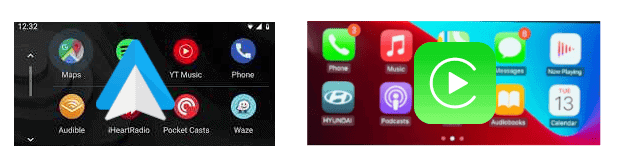
Mirroring your smartphone screen to your car’s display system can enhance your driving experience by making it safer and providing more navigation and entertainment options. Whether you have an Android or iOS device, you can easily mirror your phone to your car screen. This feature allows you to access your favorite apps and media, use GPS navigation, and stay hands-free while driving. This article offers comprehensive guidance on how to mirror your phone to your car screen, regardless of whether you’re using an Android or iOS device.
Getting Your Phone on Your Car’s Display
Android Phone Mirroring
Several methods are available to mirror your Android phone:
Mirroring Your iPhone
Important Things to Remember
By following these guidelines, you’ll be able to enjoy hands-free access to your phone’s features directly from your car’s screen.
Why Mirror Your Phone to Your Car Screen?
Mirroring your phone to your car screen offers numerous benefits:
Methods for Android Phones
1. Android Auto Screen Mirror
Android Auto is a popular method for mirroring an Android phone’s screen onto a car’s system. It’s compatible with most modern car systems and Android phones running Android 6.0 or higher. To use Android Auto:
2. MirrorLink
MirrorLink is another option for Android users, allowing you to display your phone’s content on your car’s screen and play audio through the car speakers. To use MirrorLink:
3. Screen2Auto
Screen2Auto is a third-party app for Android that mirrors your phone’s screen to the car. To use Screen2Auto:
Methods for iOS Devices
1. Apple CarPlay
CarPlay, developed by Apple, is a convenient way to mirror iPhones to a car’s display. Integrated with Siri, it allows for hands-free operation. To use CarPlay:
Can I mirror my phone to any car screen?
Not all car screens support mirroring. Check your car’s compatibility with methods like Android Auto, MirrorLink, or Apple CarPlay.
Do I need an internet connection to mirror my phone?
An internet connection is not necessary for mirroring itself, but some apps might require it.
Is mirroring the same as Bluetooth audio streaming?
No, mirroring displays your phone’s screen on the car’s infotainment system, while Bluetooth audio streaming only plays audio from your phone.
Can I use my car’s touchscreen to control the mirrored phone?
Yes, if your car’s system supports touchscreen control, you can use it to interact with your mirrored phone.
Does mirroring affect my phone’s battery life?
Mirroring, especially via a wired connection, can consume more battery. However, many systems charge your phone simultaneously.
Can I still use my phone’s functions while it’s mirrored?
Yes, your phone remains functional while mirrored to the car screen.
Is it safe to use navigation apps while driving?
Yes, but it’s recommended to set your destination before driving or use voice commands for safety.
Can all apps be mirrored to the car screen?
Most apps can be mirrored, but some might not be optimized for car screen display.
Are there any costs associated with these mirroring methods?
While Android Auto and Apple CarPlay are generally free, some third-party apps might have costs associated.
Can I mirror my phone wirelessly?
Yes, both Android Auto and Apple CarPlay offer wireless mirroring options.